How to file a pile of live AI terminal sessions: product vs practice
August 21, 2026 00:00
A dozen live Claude and Grok tabs is a common kind of dirt for a solo developer. Each tab is unfinished working memory. Closing them feels reckless. Keeping them makes them unfindable.
The fix is not another notes app. It is a different axis, then resuming those sessions into a multiplexer that does not die when you close a window. I used Herdr and Ghostty. The method is not married to either.
The agent-facing version is the skill organizing-agent-sessions. This post is the human one.
Change the axis before you move anything
The default instinct is folders: this directory is Product A, that one is study material. That fails. Where a tab was opened is where you were standing, not what the conversation is doing.
Use two axes:
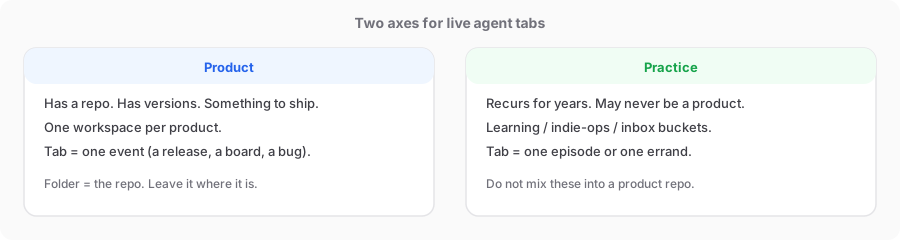
Product: a repo, versions, something to ship. One workspace per product. Tabs are events: a release, a board, a bug.
Practice: work you will repeat for years and that may never become a product. Three buckets I keep:
- Learning — podcasts, transcripts, knowledge packs; one episode per tab
- Indie-ops — not bound to one app: store programs, talks, tax and ops reviews
- Inbox — the conversation that is doing the filing. Leave it where it is.
One question: does this work have a product and a repo to ship? If yes, product. If no, but you will keep doing it, practice. If you cannot tell, stop and ask. Do not guess.
Cwd lies. A session can sit in a learning folder and still be product research. File it on the product axis and resume with the product repo as cwd.
You cannot drag a process across
A Ghostty tab cannot be moved into Herdr. Herdr owns another set of live terminals. Re-open the same conversation in the right directory with the original session ID:
claude --resume <uuid>
grok --resume <uuid>
Do not fork. Fork looks safer and throws continuity away.
Cold, finished events get a named tab and a resume one-liner in the shell. Do not bring every archive back to life in this pass.
Five steps, in this order
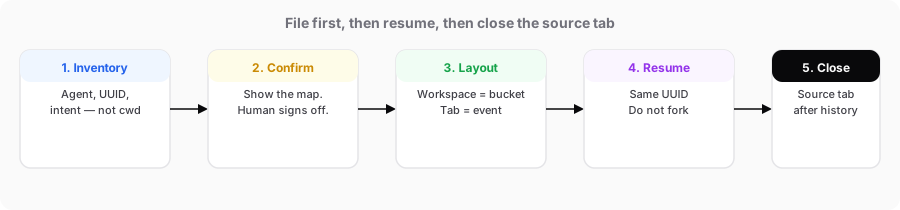
- Inventory. Agent, session ID, cwd, last intent. Classify by content.
- Confirm. Show the map. Axes, buckets, resume vs stub. Wait for a yes.
- Layout. Stay in the current Herdr session. Rename the caller to inbox. One workspace per bucket, one tab per event.
- Resume only hot work. Do not dual-run the same UUID for long.
- See the history, then close the source tab. Close the old agent tabs, not the multiplexer client.
Leave folders alone unless you explicitly decided to relocate them. Filing is sessions.
If the agent asks whether to trust a folder or use the browser, stop and ask the human.
A real pass, with names removed
About fourteen live tabs became:
- Product: a couple of app repos; hot events resumed; shipped work stubbed
- Practice: two sessions from one learning episode, two indie-ops errands, plus inbox
Grok came back idle with the same titles. Claude sometimes stops on a permission gate first — that is a new environment, not a failed resume. Keep the source tab until the old conversation is on screen.
For the next agent, and for publishing
The method is now a skill, organizing-agent-sessions (local only for now, not published). Next time, “file these tabs into Herdr” should produce a two-axis map, not a dump into the current workspace.
Do not publish real UUIDs, home-directory paths, or private revenue. “Product A / one podcast episode” is enough.
The talking-head outline is docs/scripts/organizing-agent-sessions-talk.md, about seven minutes. Script only this round — no shoot.